Running on distributed environment
Efficiently scaling models requires distributing the workload across multiple processing units. LitDet simplifies this by leveraging Pytorch distributed features [LZV+20] and PyTorch Lightning’s distributed strategies via Hydra.
Data Parallelism vs. Model Parallelism
To optimize training, it is essential to understand how the workload is split:
Data Parallelism (DDP): The most common approach where the model is replicated on every GPU, but each replica processes a different “batch” of data. Gradients are synchronized across devices at the end of each step.
Model Parallelism: Used for massive models that cannot fit on a single GPU’s memory. The model layers themselves are split across different devices.
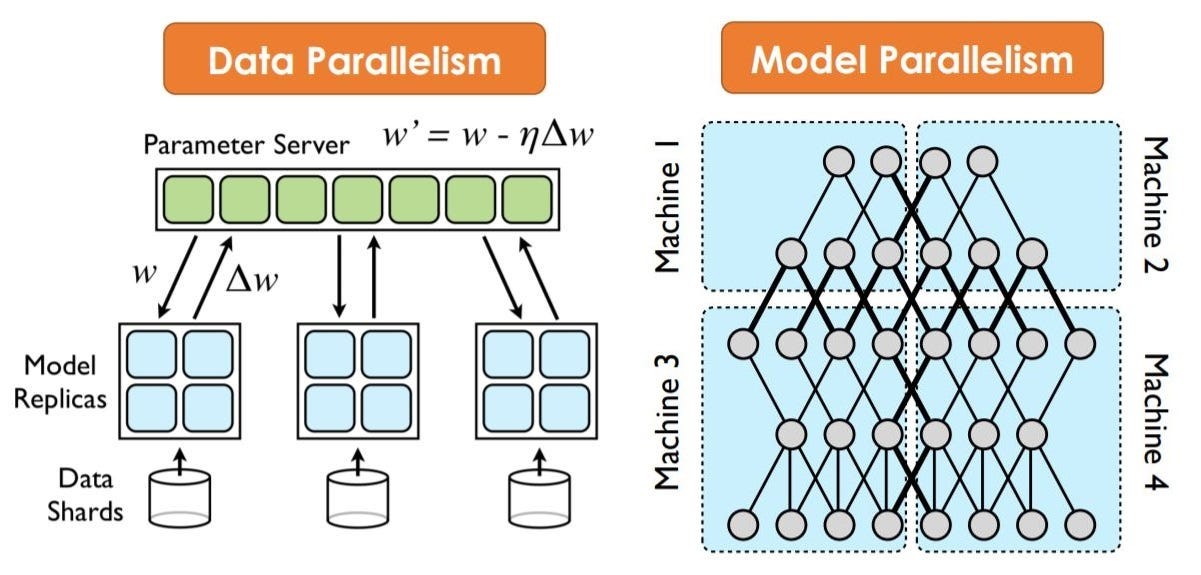
For distributed training, we recommend using the DDP strategy by default for optimal performance and synchronization, whenever the hardware permits it.
Best Practices for distributed learning
When you move from single-GPU training to DDP training, your effective batch size increases. If your base batch size per GPU is \(B\), and you train across \(k\) GPUs, your new effective batch size becomes \(B \times k\).
To maintain the same training dynamics and convergence behavior, you must scale your learning rate by that exact same factor. This known as the Linear Scaling Rule [LZV+20].
As a consequence, the scaled learning rate can increase dramatically if the number of GPUs is bigger (e.g., across 8 or 16 GPUs). Applying this massive learning rate from step zero often causes the model to diverge instantly because the initial network weights are changing too rapidly. To fix this, the authors Li et al. [LZV+20] also introduced a classical gradual warmup strategy:
Start training at the unscaled \(\eta\).
Linearly increase the learning rate over the first few epochs until it reaches the target \(\eta_{new}\).
Proceed with your normal learning rate decay schedule.
How to Run with the Trainer
You can trigger multi-GPU and multi-node training directly from the CLI by overriding the trainer configuration. For example, if you want to run on 2 nodes with 8 GPUs each (16 total):
light-train trainer=ddp trainer.devices=8 trainer.num_nodes=2
Key Parameters:
trainer=ddp: Sets the strategy to Distributed Data Parallel.trainer.devices=8: Number of GPUs to use per node.trainer.num_nodes=2: Total number of separate machines/nodes in the cluster
Containerized Execution
In High-Performance Computing (HPC) clusters, using Singularity [KcB+21] ensures environment reproducibility.
To execute a distributed run inside a container, you must:
Bind your data: Ensure your dataset and config directories are mounted.
Execute via MPI: Your cluster manager handles the orchestration of the container instances across nodes.