Hydra Advanced Configuration
LitDet leverages Hydra to provide a modular, hierarchical configuration system. Every run is governed by a composition of several YAML modules that define the data, model, and training behavior.
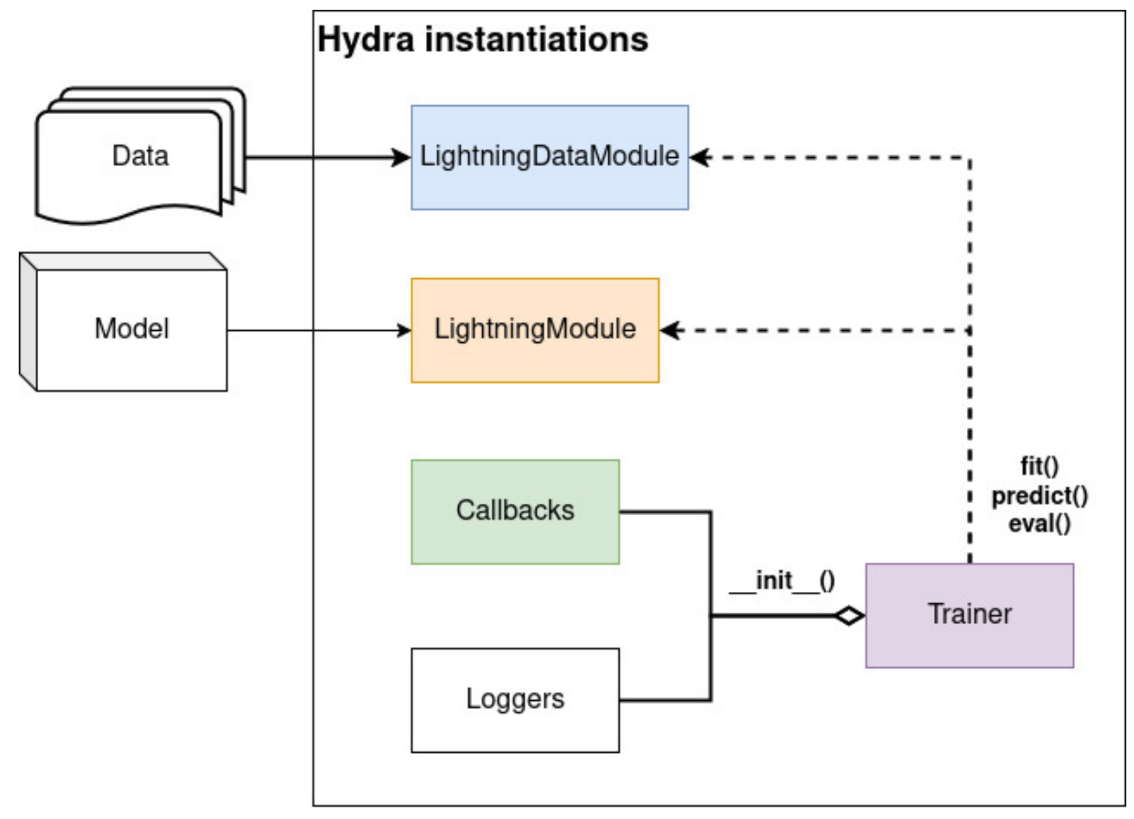
The high-level architecture of LitDet.
Hydra instantiates five primary objects based on your configuration. You can find these organized in the configs/ directory.
Data
The data module configures the LightningDataModule, which handles all data loading, splitting, and preprocessing.
_convert_: "object" # Convert ListConfig objects from transformation into a list
defaults:
  - _self_
  - transformation@train_transforms: train_transforms
  - transformation@test_transforms: test_transforms
  - transformation@predict_transforms: predict_transforms
  - transformation@post_transforms: post_transforms

_target_: litdet.data.coco_datamodule.COCODataModule
data_dir: ${paths.data_dir}
data_name: "COCO"
batch_size: 2 # Needs to be divisible by the number of devices (e.g., if in a distributed setup)
auto_partition_from_train: false
train_val_test_split: [0.8, 0.1, 0.1]
num_workers: 0
pin_memory: true
test_on_val_split: false
auto_download_dataset: false
include_background: false
is_contiguous: True
Dataset Selection: By default, LitDet uses COCO (configs/data/coco.yaml), but it also supports MNIST for classification.
Handling Missing Labels: If your dataset lacks test ground-truth (like official COCO), set data.test_on_val_split=True to use the validation set for final evaluation.
Automatic Partitioning: If you only have a training set, set data.auto_partition_from_train=True and data.train_val_test_split to automatically generate validation and test splits.
Image Augmentations: Transforms are managed via sub-configs. You can update torchvision augmentations for your config (like RandomHorizontalFlip or ScaleJitter).
Warning
We have a distinction between user-defined data augmentations (e.g. RandomPhotometricDistort), and internal pre-processing functions (e.g, ToDtype). While you can modify the former at runtime to suit your ML experiments, the latter are required for model integrity and must not be included as they are defined within the library.
Performance: To improve data loading speeds, you can keep the dataset in memory using data.pin_memory=True and accelerate batch processing by increasing data.num_workers.
Task
The task module defines the LightningModule for object detection task, which contains the model architecture, loss functions, and optimization logic.
defaults:
  - _self_
  - model: faster_rcnn

_target_: litdet.tasks.detect_module.DetectLitModule

optimizer:
  _target_: torch.optim.Adam
  _partial_: true
  lr: 1e-3
  weight_decay: 1e-6

lr_decay_config: null

lr_scheduler_config: null

compile: false

model:
  _partial_: true
Model Architectures: You can swap between detection models like Faster R-CNN (task.model=faster_rcnn) or SSD (task.model=ssd).
_target_: litdet.tasks.components.build_ssd300_vgg16

weights:
  _target_: hydra.utils.get_object
  path: torchvision.models.detection.SSD300_VGG16_Weights.DEFAULT

num_classes: 91

weights_backbone:
  _target_: hydra.utils.get_object
  path: torchvision.models.VGG16_Weights.DEFAULT

trainable_backbone_layers: 4
Depending on the model, you should define the number of classes (task.model.num_class) and optionally pre-trained weights (task.model.weights).
For a full-list of pre-trained weights, you should check the torchvision documentation or our Model Zoo.
Optimization: Configure the training by choosing an optimizer (e.g. Adam [KB17]) and adjusting its base learning rate (task.optimizer.lr) or schedule (task.lr_scheduler_config).
Check below for an example on how to setup a learning rate scheduler with ReduceLROnPlateau.
    monitor: "train/loss"
    interval: "step"
    frequency: 1
    strict: True,
    name: None,
    scheduler:
      _target_: torch.optim.lr_scheduler.ReduceLROnPlateau
      _partial_: true
      mode: min
      factor: 0.1
      patience: 10000
Note
Several features are currently in development, including support for state-of-the-art detection models like DINOv3 [SVS+25] and the implementation of layer-wise learning rate decay [BDPW22]. Furthermore, our roadmap includes expanding LitDet to support other core computer vision tasks, such as classification and segmentation.
Trainer
This module configures the lightning Trainer, controlling the hardware and the high-level training loop.
Hardware: Switch between trainer=cpu, trainer=gpu or trainer=mps (for Apple Silicon).
Performance: Enable 16-bit precision quantization with trainer=mixed_precision for faster training on compatible GPUs.
Distributed Training and Inference: Use trainer=ddp to scale across multiple GPUs. We provide more information for a distributed setup in this section.
Callbacks
Callbacks are modular tools injected into the training loop to add extra functionality.
defaults:
  - model_checkpoint
  - model_best
  - model_summary
  - rich_progress_bar
  - prediction_writer
  - _self_
Custom Visualizers: Inspect augmented images before they enter the model with callbacks=batch_visualizer.
You can also view model predictions with a custom score threshold with callbacks=prediction_visualizer.
Custom Writers: Easily write the predictions and images to disk with callbacks=batch_writer, and the annotation file with the prediction_writer callback.
Warning
The prediction_writer callback derive from the lightning BasePredictionWriter callback and is available only during the predict stage.
Standard Tools: Includes model_checkpoint for saving best model checkpoints and model_best to save the best model weights, early_stopping to prevent overfitting or rich_progress_bar for nice console output.
Note
To append multiple callbacks together, use the list operator from Hydra like so: callbacks=[batch_writer,prediction_visualizer].
And to disable all callbacks, you should use callbacks=none.
Loggers
Track your metrics and visualize experiment progress with popular lightning loggers. In addition, LitDet provides specific features for Aim and TensorBoard such as metrics visualization and predictions per valid step.
Multirun
The multi-run feature is a powerful tool for automating hyperparameter sweeps or running the same training pipeline across different configurations. It allows you to launch multiple jobs sequentially or in parallel from a single command.
To trigger a multi-run, append the -m (or --multirun) flag to your command. You can then provide a comma-separated list of values for any configuration parameter.
For example, to trigger a multirun training with different models:
light-train -m +experiment=my_config.yaml task/model=faster_rcnn,ssd,ssdlite
Multiple folders will be saved, one for each model following hydra directory pattern.
Hyper-parameter search
We integrate with Optuna through the Hydra Sweeper plugin to automate hyperparameter optimization. This enables the execution of multiple runs that leverage automated search algorithms to identify the optimal hyperparameter configuration.
# @package _global_

# example hyperparameter optimization of some experiment with Optuna:
# python train.py -m hparams_search=mnist_optuna experiment=example

defaults:
  - override /hydra/sweeper: optuna

# choose metric which will be optimized by Optuna
# make sure this is the correct name of some metric logged in lightning module!
optimized_metric: "val/acc_best"

# here we define Optuna hyperparameter search
# it optimizes for value returned from function with @hydra.main decorator
# docs: https://hydra.cc/docs/next/plugins/optuna_sweeper
hydra:
  mode: "MULTIRUN" # set hydra to multirun by default if this config is attached

  sweeper:
    _target_: hydra_plugins.hydra_optuna_sweeper.optuna_sweeper.OptunaSweeper

    # storage URL to persist optimization results
    # for example, you can use SQLite if you set 'sqlite:///example.db'
    storage: null

    # name of the study to persist optimization results
    study_name: null

    # number of parallel workers
    n_jobs: 1

    # 'minimize' or 'maximize' the objective
    direction: maximize

    # total number of runs that will be executed
    n_trials: 20

    # choose Optuna hyperparameter sampler
    # you can choose bayesian sampler (tpe), random search (without optimization), grid sampler, and others
    # docs: https://optuna.readthedocs.io/en/stable/reference/samplers.html
    sampler:
      _target_: optuna.samplers.TPESampler
      seed: 1234
      n_startup_trials: 10 # number of random sampling runs before optimization starts

    # define hyperparameter search space
    params:
      model.optimizer.lr: interval(0.0001, 0.1)
      data.batch_size: choice(32, 64, 128, 256)
      model.net.lin1_size: choice(64, 128, 256)
      model.net.lin2_size: choice(64, 128, 256)
      model.net.lin3_size: choice(32, 64, 128, 256)
Optuna Sweeper: The example above defines the logged metric (val/mAP@50-95_best) Optuna will try to maximize.
It also sets the total number of trials, and parallel jobs that will be executed.
Search Space Configuration: Defined using syntax like interval(0.0001, 0.1) for learning rates or choice(32, 64, 128) for batch sizes.
Tip
To launch a hyperparameter search, use the multirun flag in your CLI:
light-train --multirun hparams_search=mnist_optuna 'model.optimizer.lr=interval(0.0001, 0.1)'